


Mono mixing might be something you’ve heard about. It’s a technique that’s gradually gaining popularity, bringing numerous benefits, and it’s not hard to understand why many mixing engineers are adopting it.
Mono mixing is an extremely critical yet often overlooked part of the mixing workflow. It is the easiest method to ensure your mix performs well on any sound system and helps you achieve the best possible mix results. The benefits of mixing in mono are numerous.
Mixing in mono is one of the best pieces of mixing advice you can get. You must apply this technique when mixing!
What Does “Mixing in Mono” Mean?
Mono mixing is a technique employed during the mixing stage of audio production. Simply put, the audio engineer mixes while listening in mono, which means feeding the combined left and right channel signals of a stereo mix to both speakers simultaneously, instead of sending the left channel signal only to the left speaker and the right channel signal only to the right speaker.
This collapses the stereo audio into mono, meaning the listener no longer perceives two distinct channels (left and right) but only a single, unified source (the center channel).
When two speakers play the same signal, the sound is perceived as coming from directly between them. This is also known as a “phantom” mono sound, because in this case, the actual sound sources—the studio speakers—are physically placed apart.
Conversely, if the left and right speakers play different signals, you’ll perceive a stereophonic sound source spanning between them, which is a true stereo source.
Mono mixing itself is a simple operation, and there are many ways to achieve it, which we’ll detail later. Simply put, before making any mix decisions, switch the audio track playback to mono, whether via software or hardware.

Figure 1: This diagram offers a comparison of how a listener perceives the source of sound in mono versus stereo. A mono sound field makes the sound appear to come from the exact center, like a monitor placed directly in the middle. (Image source: Produced by the translator based on the original author’s graphic, background generated by Doubao AI)
Why Is Mixing in Mono So Important?
Mono mixing is one of the most practical mixing tips you’ll ever receive. It helps identify weak points in your mix and allows you to correct them easily—details that are often missed when mixing in stereo. Mixing in mono is a fantastic way to craft a cohesive mix. If you haven’t spent adequate time mixing in mono during your process, you likely haven’t achieved the best possible sound.
So, why is it critical? First, you might ask: “Who actually listens to music in mono these days?” The answer is: a lot of people, and frequently. Listeners are often in imperfect listening environments, like public spaces, cars, or gyms.
In suboptimal settings, due to poor positioning relative to the speakers, they may experience unbalanced volume from the left and right channels. In such scenarios, what they perceive might essentially be a collapsed mono signal, even if the source is stereo.
Supermarkets frequently use mono ceiling speakers, portable Bluetooth speakers often house a single driver (making them a mono source), and some radio stations still broadcast in mono.
Mono mixing is all about ensuring the quality of the audio signal is robust, delivering an acceptable listening experience to all audiences, regardless of their location or playback system.
Mono vs. Stereo Mixing: Which One Is Better?
A mono playback system uses just one speaker; to create the directional differences that allow our brains to perceive sound width and build a three-dimensional sonic image, two speakers are needed.
The only way to ensure an audio mix sounds great in both mono and stereo is to dedicate specific time to mix within both playback scenarios.
It’s not about mono mixing being better than stereo mixing, or the other way around. A mixing engineer should work in both mono and stereo during different stages of the mixing process.
Let’s look at what happens during stereo mixing. When you mix in stereo, you listen to both the left and right channels simultaneously—the left signal goes to the left speaker, the right signal goes to the right speaker.
This gives you a sense of width and allows you to pinpoint the location of sound sources in the space (like hearing an acoustic guitar on the right side of the stereo spectrum).
Some elements of a mix can only be judged accurately in stereo, like certain time-based effects (e.g., ping-pong delays that alternate between left and right). While reverb can be perceived (and applied) in mono, you should also check its performance in stereo.
On the other hand, when you listen in mono, every source in the mix “overlaps” and is perceived as one central, clustered signal. From a mix engineer’s perspective, this isn’t necessarily a bad thing because:
If a mix sounds good in mono, it will definitely sound good, and in most cases even better, when played back in true stereo!
There are critical elements in a mix that need regular checking in mono, and phase cancellation is one of them. It’s an audio phenomenon where sound waves from multiple tracks interfere and cancel out certain frequencies.
Mono mixing often exposes phase cancellation issues (for instance, hard-panned guitars might sound great in stereo but almost “disappear” when switched to mono), allowing for corrective adjustments. (Translator’s note: ‘Hard panned’ here refers to positioning one track’s pan far left [-100] and another’s far right [+100].)
Another element you must check in mono is the loudness balance of each instrument or vocal. Mono monitoring ensures that every sound is heard exactly as you intend.
Last but not least, frequency overlapping between different audio sources, known as “masking,” must also be examined in mono because it’s far easier to spot which elements “fight” each other in a mix.
How Do You Mix in Mono?
When mixing, your main task is to find the perfect balance between a multitude of different elements. Seasoned mixing engineers alternate between stereo and mono mixing at various stages of their workflow. As a general rule, you should spend about 50–70% of your time mixing in mono.
Here are four ways to switch your mix to mono playback:
- Set your master bus / main output to mono (e.g., using a dedicated channel mode button).
- Create a bus as a submix channel (routed to the main output) and temporarily pan it to mono.
- Place a plugin on your master output that has a mono switch.
- Activate the mono button on a piece of supporting audio hardware (like a monitor controller).
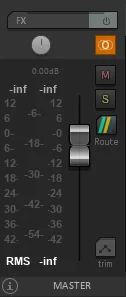
Figure 2: The master track (or master bus) mixer in some DAWs includes a “Stereo/Mono” toggle. Pictured is REAPER’s master track with the orange button for switching channel modes (lit orange for Mono). (Image source: The translator)
While detailing the correct mono mixing technique step-by-step is beyond the scope of this article, here’s an overview to start you on your way to securing the best possible mix:
How to Mix in Mono:
- Organize your tracks and check the gain level (gain staging).
In your mix project, organize your recorded tracks and group them neatly. Create submixes, checking the gain level of each track. Then, set all volume faders to zero. - Play all tracks in stereo and adjust the volume and panning to your liking.
This process takes time and shouldn’t be rushed. - Switch to mono and readjust volume and panning.
At this stage, you’ll hear all track pans collapsed to the center, layered on top of each other. Ensure all audio sources are audible. - In mono, solo all low-frequency instruments and balance the low-end of the mix individually.
Translator’s note: “Balance” here refers to loudness balance—adjusting volumes of low-end instruments to sit cohesively.
Audio sources with substantial low-frequency content should be placed in the center of the stereo field. - Switch back to stereo and confirm all your balancing adjustments.
By this point, your initial mix should sound decent in both stereo and mono. - Apply your mixing processing in mono.
This next mono mixing stage will be quite long. Switch back to mono and apply key mixing processes (like EQ and compression), while checking for phase issues and frequency masking. - Switch back to stereo for applying effects like time-based effects, reverb, etc.
Switch back to stereo to apply effects that require listening within a stereo environment, such as time-based effects (e.g., delay) and reverb. - Apply volume and pan automation if needed to further enhance the mix.
During the automation process, switch between mono and stereo from time to time. (Translator’s note: This is to check mix performance, as issues, especially from panning automation, are often more audible in mono.) - Re-listen to the finished mix in various devices and platforms in both mono and stereo.
Ensure your mix sounds great everywhere, on any device. - Finally, export your mix in stereo format.
Essential Tips for Mixing in Mono
- Spend around 50–70% of your mixing time in mono.
- Always remember: if a mix sounds good in mono, it will sound good in stereo.
- Try to mix at a low and consistent listening level to maximize aural perception and prevent hearing damage.
- Find a quick and convenient method to toggle your audio playback to mono instantly (like a hardware button or a plugin switch).
- Learn about the LCR mixing philosophy (hard-panning elements strictly to Left, Center, or Right) to further improve mix separation and clarity.
- Consider investing in a dedicated mono studio monitor (single speaker) to check your mix on a true point source.
The Key Benefits of Mono Mixing
Mono mixing simplifies the process, forcing you to focus on what truly matters in a mix. While the process may not be the most glamorous, it’s vital. Mix decisions made in mono often circumvent many common mixing pitfalls, significantly elevating your results.
The benefits of mono mixing are clear:
- An improved overall volume balance and tonal balance in the mix.
- Ensures consistency across different playback devices and environments.
- Reveals and allows you to fix frequency masking and phase cancellation in overlapping elements.
- Helps balance the low-end of the mix.
- Makes the mix clearer and more impactful.