


Introduction
The open-source audio plugin ecosystem has been lacking an affordable, high-quality integrated mastering solution for a long time. Released in 2020, master_me perfectly fills this market gap.
It is a free, open-source, all-in-one real-time mastering plugin, specially designed for live streaming, web radio, podcast broadcasting and live audio scenarios. It can provide immediate and transparent final audio polishing, serving as a cost-effective alternative to commercial mastering suites.
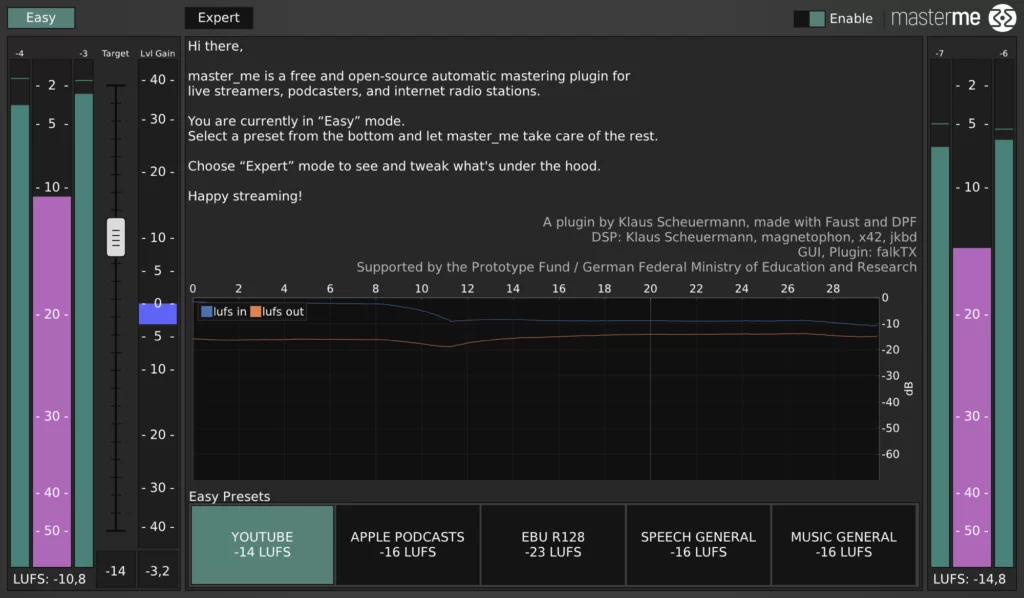
In the first part of this series, we introduced the basic installation, factory presets and simple operation logic of master_me.
In this second chapter, we will focus on in-depth Expert Mode settings, parameter adjustment skills, music scene adaptation schemes and system performance optimization suggestions.
1. In-depth Usage of Expert Mode
master_me provides two core operation modes to meet different user groups:
-
- Easy Mode: One-click preset for quick use, suitable for beginners and rapid live broadcasting.
- Expert Mode: Fully unlocked parameter panel, supporting full-chain audio adjustment for advanced producers.
The five built-in presets in Easy Mode can cope with most daily scenarios, but for personalized sound tuning, Expert Mode is essential.
1.1 Input Gain Pre-Processing
Reasonable input level is the premise of high-quality mastering.
The built-in input gain slider can reasonably balance the too weak or overloaded audio signal, avoid subsequent compression distortion, and maintain the overall balance of the original mixing track.
1.2 Multifunctional EQ Module
The equalizer section of master_me integrates high-pass filtering, tilt EQ and side stereo EQ, realizing precise frequency shaping.
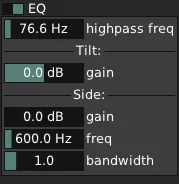
High-Pass Filter
Cut low-frequency rumble and sub-muddy sound:
-
- Live music: 60Hz–80Hz cutoff frequency
- Voice broadcast & podcast: 100Hz–300Hz cutoff frequency
Tilt EQ
Quickly balance the overall brightness and thickness of the sound, adjust the high-frequency and low-frequency energy ratio in one step, suitable for overall timbre correction.
Side EQ
Independently adjust the stereo side channel, enhance spatial reverberation and stereo width, and make the narrow and dry mix more layered.
1.3 Knee Compressor Configuration
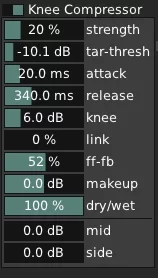
The dynamic compression unit adopts mid-side linkage design, which is the core module for controlling audio dynamics.
-
- Tar-Thresh: Target loudness threshold setting
- Compress with a moderate ratio to prevent excessive dynamic squeezing
- Link parameter: Adjust the fusion degree of mid channel and side channel compression
1.4 Multi-Band Mid-Side Compression
The MMSC multi-band mid-side compression is the most advanced function of master_me.
Users can independently adjust the compression intensity of low frequency and high frequency bands, and the middle frequency band will be automatically interpolated and linked.
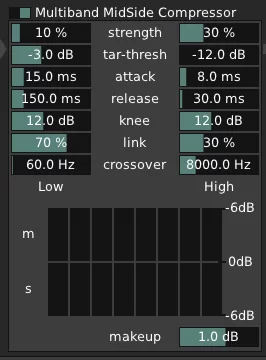
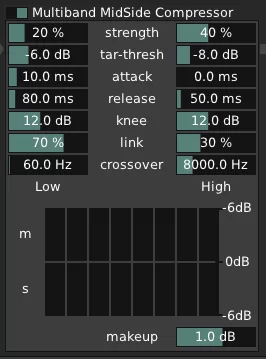
It is recommended for novice users to use the official factory preset first, and gradually try band fine-tuning after getting familiar with the sound changes.
1.5 Intelligent Limiter
The built-in limiter focuses on dynamic overall control rather than simple peak limiting.
Reasonable attack and release time settings can simulate analog dynamic texture, and also create warm lo-fi saturation effects through ultra-low threshold settings.
2. Modify Parameters for Formal Music Mastering
Although master_me is oriented to real-time streaming scenarios, it can also be modified and applied to traditional music post-mastering.
2.1 Core Defect of Default Mode
The official default leveler will slowly increase the volume after silent segments.
This design is friendly for live streaming, but it will destroy the natural weak intro of instrumental music and songs.
2.2 Key Optimization: Brake Threshold
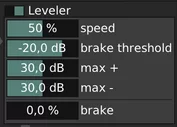
Lower the Brake Threshold value to below the minimum noise floor of the track,
shorten the automatic gain response time, and solve the problem of slow volume rise in music intro.
2.3 Auxiliary Parameter Tuning
-
- Speed: Control the response speed of automatic gain
- Max +/- Gain Range: Adapt to songs with large dynamic contrast
3. Hardware Performance & System Optimization
master_me involves multi-layer DSP operation, and different devices have obvious differences in CPU occupancy.
3.1 Actual Operation Occupancy Test
-
- High-performance desktop: Low CPU usage, stable long-term live broadcast
- Old low-voltage notebook: Need to turn off redundant modules to reduce load
3.2 Practical Optimization Tips
-
- Disable unused EQ, compression and gating modules
- Appropriately increase the audio buffer size in streaming software
- Load master_me only on the final stereo master track
- Close background high-power occupation software during live broadcast
4. Summary & Applicable Crowds
Developed by Klaus Scheuermann and based on Faust and DPF development framework,
master_me is a rare high-quality open-source mastering tool in the industry.
✅ Core Advantages
-
- 100% free and open source
- One-stop integrated audio processing
- Suitable for live streaming, podcast, radio and music production
- Lightweight deployment, cross-platform compatibility
Whether you are a live stream anchor, amateur music producer, podcast operator or audio enthusiast,
master_me is a zero-cost and high-return audio mastering solution worthy of long-term use.


UNCUCO S-01A Straight Type Professional Recording Studio Desk-Music Production
Price range: $1,295.00 through $1,758.00

UNCUCO S-02B Curved Type Recording Studio Desk-19 Inch Rack Workstation
Price range: $1,323.00 through $1,695.00

UNCUCO S-03C Curved Type Studio Desk | Professional Music Production Desk for Audio Console Mixer
Price range: $1,678.00 through $1,887.00