

Feel lost when it comes to compressors and dynamics? Don’t worry. This comprehensive guide will walk you through their core functions and critical settings, step by step.

Figure 1: Reference settings for four common mixing scenarios. (Image credit: Future)
Most people interested in music production or recording have a general idea of what a compressor does. Simply put, a compressor squeezes the incoming audio signal by reducing dynamic peaks that exceed a certain threshold.
This narrows the dynamic range—the difference between the loudest and quietest parts. Consequently, the overall perceived volume sounds louder because you can boost the track’s level without worrying about clipping distortion. However, if done poorly, excessive compression can make music sound flat and lifeless.
For novice producers, compression can be confusing—and honestly, it can be for seasoned pros too. Tutorials often advise you to “trust your ears” or “add compression to taste,” but that’s often unhelpful for a beginner unsure of where to start.
Consider this article your ultimate cheat sheet. In the “10 Basic Compression Settings for Common Scenarios” section below, we outline fundamental settings for various applications.
Crucial disclaimer: Do not treat these examples as rigid rules. Think of them as presets—launchpads for your own adjustments.
Compression and dynamic processing should always be tailored to the incoming audio. If something else sounds right, don’t hesitate to ignore these numbers.
Ultimately, trust your ears. If a different setting—or even no compression—sounds better, then go with what works best.
Compression Control Parameters Explained
While different compressors work in slightly different ways and offer varying control options, most share a common set of parameters.
Threshold
The threshold sets the volume level at which the effect kicks in. Any audio signal exceeding this level gets compressed (i.e., its volume is reduced).
Ratio
The degree of compression is determined by the ratio. For instance, a 2:1 ratio means that for every 2 dB the signal exceeds the threshold, its output will only increase by 1 dB. If it goes over by 2 dB, the signal is reduced by 1 dB; if by 6 dB, it’s reduced by 3 dB.
Higher ratios mean more intense compression, up to the extreme of infinity (∞:1). At this setting, the compressor becomes a hard limiter, completely preventing any signal from exceeding the threshold.
Some compressors also offer “upward” compression. This is the opposite approach, where signals below the threshold are boosted in volume.
Attack and Release
Attack and release determine how quickly compression is applied and stopped.
Attack controls how fast the volume is reduced once the signal exceeds the threshold. A setting of 0 means the compressor acts instantly, while a longer attack time introduces the compression more gradually.
Release controls how fast the gain reduction stops once the signal drops below the threshold. A setting of 0 stops compression instantly; a longer release time means the effect fades out more slowly.
Sidechain Input
Many compressors feature a sidechain input. This allows an external signal to trigger the compressor. A classic use is feeding a kick drum signal into the sidechain to duck the volume of a bassline, preventing them from clashing when they play simultaneously.
What Are the Different Types of Compressors?
Not all compressors are equal. Why do they sound different, and how do you know which type to use when?
Dating back to vintage hardware, several distinct detector/gain control circuit types are often modeled in modern plugins:
-
- VCA (Voltage-Controlled Amplifier): Extremely versatile, though this flexibility can make them harder to dial in.
- FET (Field Effect Transistor): Fast and responsive, but more prone to distortion—although this can be musically pleasing.
- Opto (Optical, based on a bulb and photocell): Smoother, more musical attack that often lets fast transients pass through.
- Variable-Mu (based on valve plate voltages): Attack can be very fast, but threshold, ratio, and knee shape are typically intertwined with the unit’s behavior. Some feature automatic release, adjusting based on the input signal.
In the plugin world, you’ll also encounter multiband compression. This splits the signal into different frequency bands and compresses them independently, functioning more like a hybrid of compression and EQ.
Does Every Sound in a Mix Need Compression?
In a word: no. If a sound is already working perfectly without compression, don’t just slap a compressor on simply because you feel it’s the “professional” thing to do.
Also, remember that other effects can achieve similar results. Subtle saturation, for example, is often as effective as compression at controlling peaks while adding pleasant harmonics.
10 Basic Compression Settings for Common Scenarios
Voice (Lead Melody or Vocal)

Figure 2: “Voice” generally refers to a track’s lead melody or main vocal, such as a lead singer. (Image credit: Future)
-
- Suitable Compressor Types: VCA, FET, Opto, Variable-Mu
- Attack: Fast
- Release: Medium
- Ratio: 4:1
- Gain Make-Up Mode: Auto
- Expected Gain Reduction: 4–6 dB (Adjust the threshold while watching the gain reduction meter to reach this target.)
Snare Drum

Figure 3: Basic compression settings for a snare drum. (Image credit: Future)
-
- Suitable Compressor Types: VCA, FET
- Attack: Fast (slightly higher setting than “Voice”)
- Release: Ultra-Fast (close to 0 ms)
- Ratio: 4:1
- Gain Make-Up Mode: Auto
- Expected Gain Reduction: 4–10 dB
Acoustic Guitar

Figure 4: Basic compression settings for an acoustic guitar. (Image credit: Future)
-
- Suitable Compressor Types: VCA, Opto
- Attack: Fast (same setting as “Snare Drum”)
- Release: Medium
- Ratio: 4:1
- Gain Make-Up Mode: Manual
- Expected Gain Reduction: 2–6 dB
Drum Kit Overheads
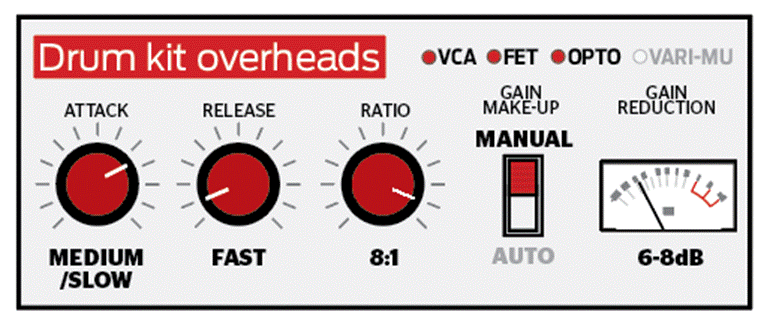
Figure 5: Basic compression settings for drum kit overhead microphones. (Image credit: Future)
-
- Suitable Compressor Types: VCA, FET, Opto
- Attack: Medium or Slow (Choose one based on the feel.)
- Release: Fast
- Ratio: 8:1
- Gain Make-Up Mode: Manual
- Expected Gain Reduction: 6–8 dB
Bass Guitar
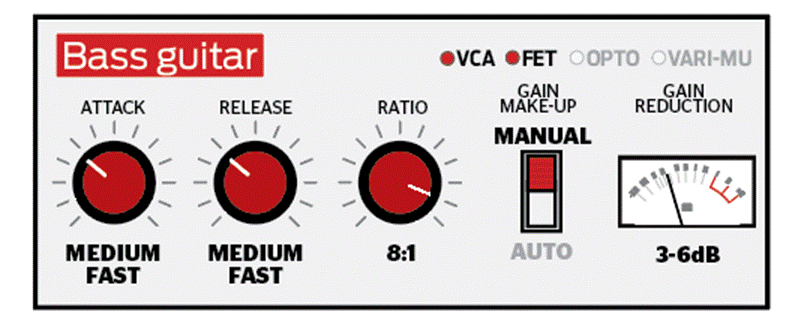
Figure 6: Basic compression settings for a bass guitar. (Image credit: Future)
-
- Suitable Compressor Types: VCA, FET
- Attack: Medium-Fast
- Release: Medium-Fast
- Ratio: 8:1
- Gain Make-Up Mode: Manual
- Expected Gain Reduction: 3–6 dB
Kick Drum
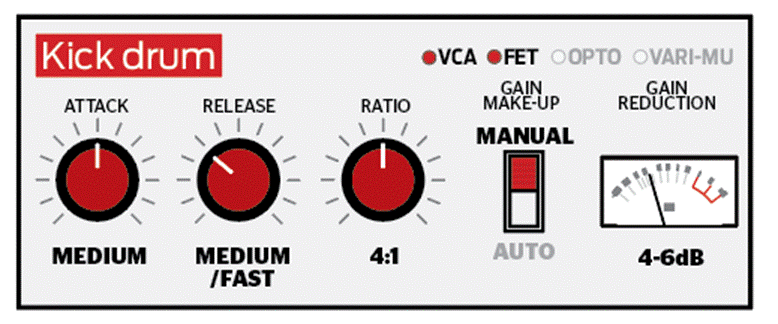
Figure 7: Basic compression settings for a kick drum. (Image credit: Future)
-
- Suitable Compressor Types: VCA, FET
- Attack: Medium
- Release: Medium or Fast
- Ratio: 4:1
- Gain Make-Up Mode: Manual
- Expected Gain Reduction: 4–6 dB
Picked Electric Guitar
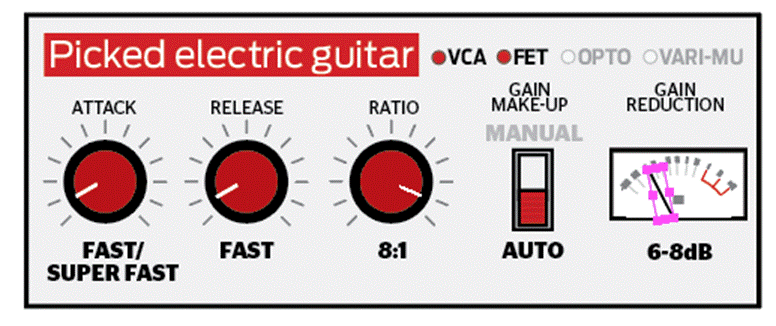
Figure 8: You can apply this basic compression setting for picked electric guitar. (Image credit: Future)
-
- Suitable Compressor Types: VCA, FET
- Attack: Fast or Ultra-Fast
- Release: Fast
- Ratio: 8:1
- Gain Make-Up Mode: Auto
- Expected Gain Reduction: 6–8 dB
Lead Synths
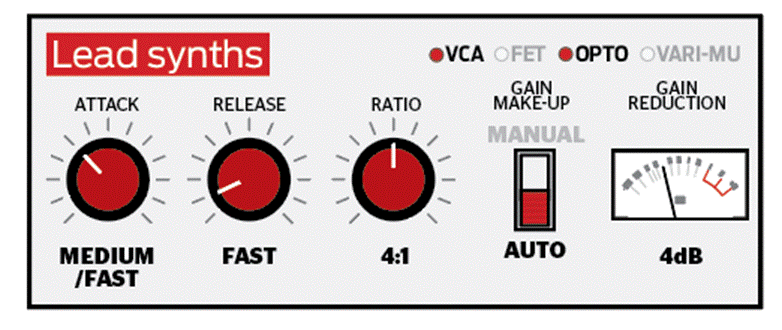
Figure 9: Compression settings suitable for lead synthesizers. (Image credit: Future)
-
- Suitable Compressor Types: VCA, Opto
- Attack: Medium or Fast
- Release: Fast
- Ratio: 4:1
- Gain Make-Up Mode: Auto
- Expected Gain Reduction: 4 dB
Bus Compression (Edgy)
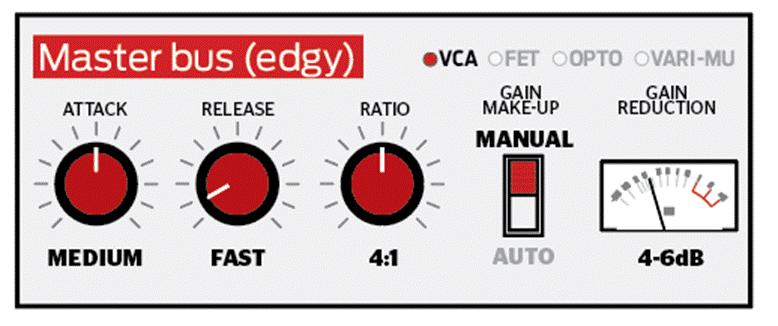
Figure 10: Loading a compressor on the mix bus with “edgy” parameters. Expect a heavier amount of compression, around 4–6 dB. (Image credit: Future)
-
- Suitable Compressor Type: VCA
- Attack: Medium
- Release: Fast
- Ratio: 4:1
- Gain Make-Up Mode: Manual
- Expected Gain Reduction: 4–6 dB
Bus Compression (Smooth)
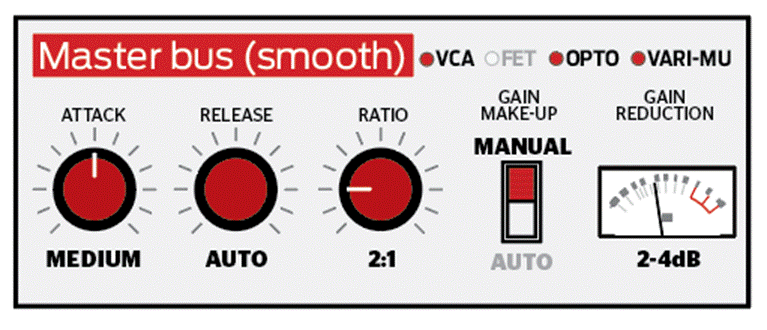
Figure 11: Compared to the edgy scheme, the “smooth” compression setting is much gentler, with an expected gain reduction of 2–4 dB. (Image credit: Future)
-
- Suitable Compressor Types: VCA, Opto, Variable-Mu
- Attack: Medium
- Release: Auto
- Ratio: 2:1
- Gain Make-Up Mode: Manual
- Expected Gain Reduction: 2–4 dB
Important Notes from the Translator
-
- For Attack and Release: Refer to the knob positions in the images for a general starting point. Different compressors have different designs, so the exact values will depend on the specific unit you are using.
- Auto-Release: Not all compressors offer an automatic release setting. If yours does not and you are trying the “Bus Compression (Smooth)” setup, you will need to adjust the release time by ear until it sounds natural and unobtrusive.
- Make-Up Gain: This function compensates for the volume loss caused by compression. The setups above mainly suggest a working mode (Manual or Auto). Decide whether to activate it based on your actual needs. Note that not all compressors offer manual gain make-up.
About the Author: Si Truss
I am the Executive Editor for Music Technology at MusicRadar, and a former editor of Future Music, Computer Music, and Electronic Musician. I’ve been exploring music technology for over two decades, though I’ve mostly been forgetting how to play the guitar for the past ten. You’ll often find me in the chill-out zone at raves, complaining that it’s “way past my bedtime.”


UNCUCO S-01A Straight Type Professional Recording Studio Desk-Music Production
Price range: $1,295.00 through $1,758.00- Fully Customizable: Size, Logo, Color, Lighting, Style, Finish, Casters, Special Requirements
- Free Shipping to Worldwide, No Customs Duties.
- Zero Fee Door to Door Delivery, Multiple Protection Packing.
- Upgrade Your Studio Space Right Now !


UNCUCO S-02B Curved Type Recording Studio Desk-19 Inch Rack Workstation
Price range: $1,323.00 through $1,695.00- Fully Customizable: Size, Logo, Color, Lighting, Style, Finish, Casters, Special Requirements
- Free Shipping to Worldwide, No Customs Duties.
- Zero Fee Door to Door Delivery, Multiple Protection Packing.
- Upgrade Your Studio Space Right Now !


UNCUCO S-03C Curved Type Studio Desk | Professional Music Production Desk for Audio Console Mixer
Price range: $1,678.00 through $1,887.00- Fully Customizable: Size, Logo, Color, Lighting, Style, Finish, Casters, Special Requirements
- Free Shipping to Worldwide, No Customs Duties.
- Zero Fee Door to Door Delivery, Multiple Protection Packing.
- Upgrade Your Studio Space Right Now !


UNCUCO S-04D Curved Type Recording Studio Workbench 19-Inch Rack Audio Production Mixing Desk
Price range: $1,698.00 through $1,852.00- Fully Customizable: Size, Logo, Color, Lighting, Style, Finish, Casters, Special Requirements
- Free Shipping to Worldwide, No Customs Duties.
- Zero Fee Door to Door Delivery, Multiple Protection Packing.
- Upgrade Your Studio Space Right Now !


UNCUCO S-05E Studio Mixing Desk: The Ultimate Workstation for Avid C24 & Pro Tools Workflows
$1,748.00- Fully Customizable: Size, Logo, Color, Lighting, Style, Finish, Casters, Special Requirements
- Free Shipping to Worldwide, No Customs Duties.
- Zero Fee Door to Door Delivery, Multiple Protection Packing.
- Upgrade Your Studio Space Right Now !


UNCUCO S-06F 3-Rack Studio Desk For Audio Production Console
$1,950.00- Fully Customizable: Size, Logo, Color, Lighting, Style, Finish, Casters, Special Requirements
- Free Shipping to Worldwide, No Customs Duties.
- Zero Fee Door to Door Delivery, Multiple Protection Packing.
- Upgrade Your Studio Space Right Now !


UNCUCO S-07Q Recording Studio Table Music Audio Control Operation Desk
$878.00- Fully Customizable: Size, Logo, Color, Lighting, Style, Finish, Casters, Special Requirements
- Free Shipping to Worldwide, No Customs Duties.
- Zero Fee Door to Door Delivery, Multiple Protection Packing.
- Upgrade Your Studio Space Right Now !


UNCUCO S-01A 1.6M Studio Console Desk | Professional Audio Workstation Furniture
Original price was: $1,250.00.$921.00Current price is: $921.00.- Fully Customizable: Size, Logo, Color, Lighting, Style, Finish, Casters, Special Requirements
- Free Shipping to Worldwide, No Customs Duties.
- Zero Fee Door to Door Delivery, Multiple Protection Packing.
- Upgrade Your Studio Space Right Now !


UNCUCO Custom Recording Studio Table For Audio Control Console Mixer
$982.00- Fully Customizable: Size, Logo, Color, Lighting, Style, Finish, Casters, Special Requirements
- Free Shipping to Worldwide, No Customs Duties.
- Zero Fee Door to Door Delivery, Multiple Protection Packing.
- Upgrade Your Studio Space Right Now !