

Description: Ear fatigue can distort your perception and ruin your mixes. Learn the causes, symptoms, and proven strategies—from studio best practices to advanced tools—to protect your hearing and make better mixing decisions.
The Producer’s Guide to Preventing Ear Fatigue During Mixing & Mastering
For anyone spending long hours on music production or mixing, ear fatigue is a common and frustrating problem. It can distort your perception of sound, lead to poor mixing decisions, and even affect your long-term hearing health. In this article, we’ll explore what ear fatigue is, why it happens, and how to prevent and manage it. We’ll cover practical tips, technical advice, and even recommend software to help you maintain clear, accurate hearing throughout your workflow.
When you’ve been working in the studio for hours on end, your ears can start to “lie” to you about what you’re hearing. This article dives into the causes and symptoms of ear fatigue and provides coping strategies—from basic best practices to advanced workflow adjustments. Whether you’re a budding beginner or a seasoned veteran, these insights will help you produce and mix more efficiently without overburdening your auditory system.
What is Ear Fatigue?
Ear fatigue, also known as listening fatigue, typically occurs during prolonged exposure to sound, especially at high volumes. It’s a decline in your ears’ ability to perceive audio accurately. Over time, your auditory system becomes less sensitive, causing details to blur and your perception of frequencies to shift. As a result, elements in your mix that once sounded clear might suddenly appear dull or exaggerated.
Why Does It Happen?
Ear fatigue occurs because our ears are biological sensors that adapt to continuous stimulation. When you listen at high volumes or for extended periods, the hair cells in your inner ear and the neural pathways in your brain begin to overwork. This leads to a temporary decrease in sensitivity, particularly to high frequencies. Over time, this can cause you to make misguided mixing decisions, like over-compensating with EQ or volume adjustments that only worsen the problem.
What Causes Ear Fatigue in Music Production?
Preventing ear fatigue starts with understanding its causes. The triggers are varied, and identifying and addressing them can create a healthy, productive environment for your mixing work.
Prolonged Exposure to High Volume
High-volume work is the primary culprit. The greater the sound pressure, the faster your ears tire. Sustained loud sound overloads your auditory system, leading to reduced sensitivity and even temporary threshold shifts.
Insufficient Breaks
Mixing for hours on end without breaks leaves your ears with no time to recover. Continuous, focused listening can overload your auditory senses, making it difficult to discern balance and clarity in your mix.
A Non-Ideal Listening Environment
Your studio’s acoustics and monitoring setup play a crucial role. Improperly calibrated monitors, an untreated room, or even uncomfortable headphones can exacerbate auditory fatigue. When your environment forces your ears to work harder to discern detail, fatigue sets in much faster.
Recognizing the Signs of Ear Fatigue
Knowing the early signs is critical so you can take corrective action before your mix suffers. Here are key indicators:
Altered Perception of Frequency Response
-
- Dull or Muffled Sound: When your ears are tired, high frequencies can seem diminished. This can rob cymbals and vocals of their brightness.
- Exaggerated Bass or Treble: You might notice the low-end sounding overwhelmingly heavy or the high-end overly harsh, leading to an unbalanced mix.
Volume and Compensation Adjustments
-
- Turning Up the Volume: A classic symptom is unconsciously increasing the monitoring level. As your ears struggle to capture detail, you might feel the need to compensate, which only accelerates fatigue.
- Circular Mixing Decisions: If you find yourself repeatedly tweaking an EQ or a balance setting without solving the problem, it’s a strong sign your ears are no longer reliable.
Physical Discomfort and Tinnitus
Physical discomfort and tinnitus are common signals of ear fatigue, often experienced by musicians and audio professionals due to prolonged sound exposure. Recognizing these symptoms is vital, as they affect not only hearing health but overall physical well-being.
-
- Ear Pressure or Fullness: You might feel a pressure in your ears, similar to the sensation after a loud concert.
- Ringing (Tinnitus): A persistent ringing or buzzing in your ears is a major red flag to stop and rest.
- Headaches and Dizziness: Physical signs like a headache or a sense of dizziness can also accompany ear fatigue.
Best Practices for Preventing Ear Fatigue
The key to prevention lies in developing healthy studio habits. By adjusting your workflow and environment, you can work longer and mix more accurately without overburdening your ears.
Control Your Monitoring Level
Working at a moderate volume (typically around 75–85 dB SPL) is ideal. This level lets you hear detail clearly without excessive strain. A simple rule of thumb is to set the volume so you can comfortably hold a conversation while music is playing.
Use an SPL meter or your DAW’s built-in tools to monitor your output level. Many professionals mark a “safe volume” on their monitor controller to ensure they don’t creep past a comfortable level, preventing the gradual volume increase that often comes with fatigue.
Take Regular Breaks
Your ears gradually lose sensitivity to detail during long sessions. Short, frequent breaks help reset your auditory perception. Step away from the sound, embrace some quiet, and let your ears recover for better judgment and clarity.
Take a break every 60–90 minutes. Even a 10–15 minute pause can reset your auditory system and let you return with fresher ears.
Optimize Your Listening Environment
Your environment plays a huge role in how accurately you perceive sound. An optimized space reduces ear fatigue and improves your mixing decisions.
◆ Choosing the Right Monitors and Headphones
Invest in monitors and headphones known for a flat, neutral frequency response. Open-back headphones are often recommended for long sessions, as they tend to put less pressure on the ears than closed-back designs.
◆ Room Treatment and Calibration
A properly treated room minimizes unwanted reflections and resonances, leading to a more accurate sound. Basic acoustic treatment—such as bass traps, diffusers, and absorption panels—smoothes your room’s frequency response, ensuring your ears don’t have to strain to understand sonic details.
Technical Solutions to Manage Ear Fatigue
While healthy habits form the foundation, various technical tools can further help you maintain perspective during long mixing sessions.
Monitoring and Frequency Analysis Software Tools
When mixing or mastering audio, relying solely on your ears can sometimes lead to fatigue and perceptual bias. This is where visual monitoring tools come in, offering an objective view of your frequency balance and mix clarity.
These tools give you a visual representation of your mix’s frequency content. Plugins like spectrum analyzers or tonal balance control meters can show if certain frequency ranges are being over-emphasized, even when your ears don’t catch it. This objective data is invaluable when you suspect fatigue is warping your perception.
Using reference tracks is a time-tested method for calibrating your ears. Some tools offer convenient A/B comparison features, letting you quickly switch between your mix and a professionally balanced track. This helps reset your auditory benchmark and highlights differences that fatigue might be masking.
Plugins for Frequency Balancing and Reducing Harshness
Harsh frequencies can rapidly cause ear fatigue, making a mix uncomfortable over time. Fortunately, modern plugins offer powerful solutions for taming these problematic elements.
Dynamic EQs adjust frequency content based on the signal’s intensity, helping to tame fatiguing, harsh highs. Similarly, de-esser plugins can soften strident sounds—especially in vocals—without sacrificing clarity.
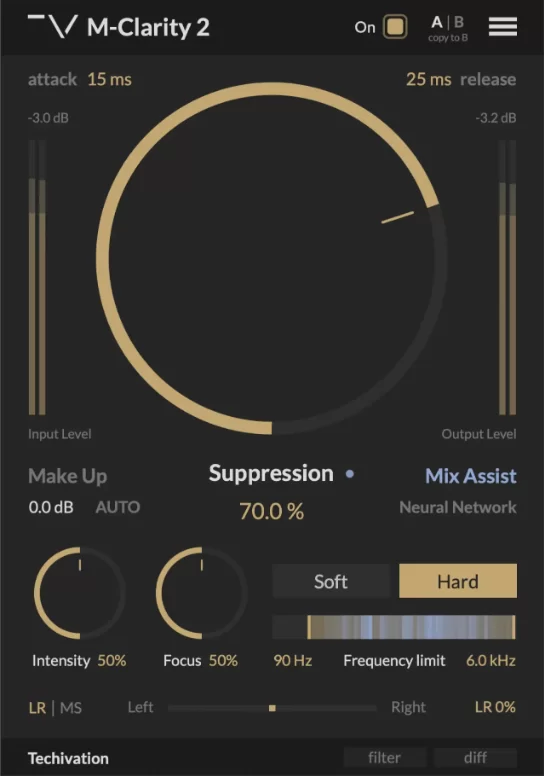
Figure 1: Automatic resonance suppressors can remove muddy resonances, boxiness, and harsh frequencies. Pictured is the M-Clarity 2 dynamic resonance suppressor. (Image: Techivation)
Plugins like automatic resonance suppressors or soft-saturation tools can help you smooth out problematic frequencies that stress the ear. These tools analyze your mix and automatically reduce resonant peaks that cause listening fatigue, making the overall sound more balanced and comfortable during long listening sessions.
Advanced Techniques for Seasoned Producers
Once you’ve mastered the basics, these advanced techniques can help you further mitigate ear fatigue and ensure your mixes translate well everywhere.
Mixing at Low Volume
Working at lower volumes not only protects your hearing but also forces you to focus on the core balance of a mix.
Strategies for Low-Volume Mixing:
-
- Check your mix quietly: Periodically drop the volume to see if all elements remain clear and discernible.
- Use the “whisper test”: Turn the mix down to a level where you can just make out all the individual elements.
- Switch between levels: Briefly alternate between a low and a moderate volume to ensure the mix holds up well under different listening conditions.
The Benefits: Mixing at low levels reduces the intensity of fatiguing frequencies and prevents overload. It forces you to prioritize clarity and balance because you can’t rely on high volume to mask flaws.
Using Reference Tracks Effectively
Maintaining objectivity during a mix can be a challenge, especially as ear fatigue creeps in. Your perception of tonal balance, dynamics, and clarity can drift over time. This is where reference tracks become an essential tool. Regularly comparing your work to professionally mixed and mastered tracks helps you stay anchored to a reliable sonic standard, ensuring your final mix translates well across different playback systems.
Optimizing Your Workflow to Prevent Fatigue
A flexible, optimized workflow is your defense against fatigue.
Set a timer or alarm to remind you to take regular breaks during your session. Consistent breaks allow your ears to recover and help you maintain focus during long stretches of work.
Switch regularly between your studio monitors and headphones. Different sources present sound in distinct ways, which helps break the monotony that leads to fatigue. This switch not only gives you a fresh perspective but also encourages you to tailor your mix for multiple playback systems.
Improving Your Room Acoustics
A well-tuned room significantly reduces the effort your ears need to interpret sound. Invest in basic acoustic treatment like bass traps, diffusers, and absorption panels. These improvements smooth out your room’s frequency response and reduce reflections, giving you more confidence to mix at lower volumes.
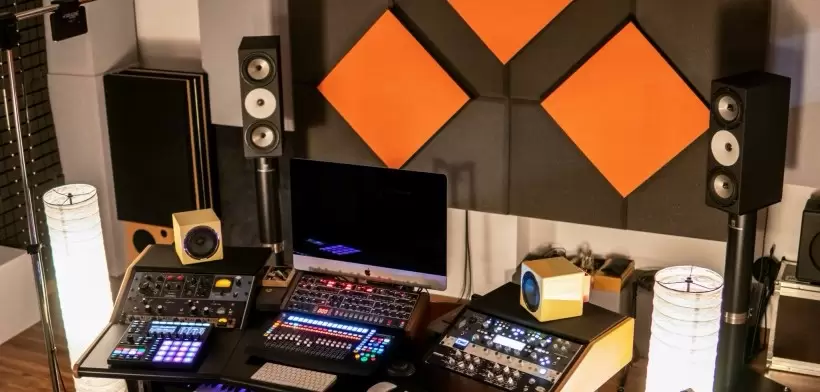
Figure 2: An audio production studio equipped with multiple monitoring sources and acoustic absorption panels. (Image: MasteringBox)
You can also consider using room correction plugins or hardware solutions to balance your monitoring response. These tools can correct for acoustic deficiencies in your room, ensuring your mix decisions are based on what’s actually in the recording.
Building a Workflow for “Fresh Ears”
Long-term success in music production and mixing means creating a workflow that prioritizes ear health.
Recognize When to Pause
Ear fatigue can sneak up on you, making it critical to identify when your ears are no longer trustworthy. If you notice persistent issues, like a veiled high-end or physical discomfort, it’s time to take a break. Trust your instincts—no mix decision is worth sacrificing your hearing.
Establish an Ear Recovery Routine
Incorporate a recovery routine into your workflow. This could include scheduled breaks, short periods of complete silence, or even stepping outside the studio for a brief walk. Establishing this routine not only protects your ears but also refreshes you mentally, unlocking new creativity.
Long-Term Strategies for Healthy Hearing
Consider long-term practices like scheduling regular hearing tests and using high-quality audio gear that doesn’t strain your ears. Educate yourself on best practices for volume management and environmental setup. Over time, these habits will not only preserve your hearing but also improve the quality of your mixing decisions.
Conclusion
Ear fatigue is an unavoidable challenge in music production and mixing, but with the right practices and tools, you can minimize its impact. Remember, your ears are your most important piece of gear. Taking the time to build a healthy workflow is just as important as dialing in an EQ or compressor.
By mixing at safe levels, taking regular breaks, improving your environment, and leveraging technical tools, you can protect your hearing while producing better mixes. Advanced techniques—like low-volume mixing, effective use of references, and improved room acoustics—help ensure your creative spark stays sharp and accurate, even after long hours.
Ultimately, managing ear fatigue properly not only improves your music’s quality but also ensures your creative longevity. Whether you’re just starting out or you’re a veteran refining your process, keeping your ears “fresh” allows you to make better mixing decisions, maintain creative energy, and safeguard your hearing for years to come.
Spend time experimenting with these tips and weave them into your daily routine. Over time, you’ll find your mixes are more balanced, your decisions more confident, and your overall studio experience far more enjoyable. Always prioritize quality over quantity, and remember: a short pause can lead to lasting, high-quality mixes.


UNCUCO S-01A Straight Type Professional Recording Studio Desk-Music Production
Price range: $1,295.00 through $1,758.00- Fully Customizable: Size, Logo, Color, Lighting, Style, Finish, Casters, Special Requirements
- Free Shipping to Worldwide, No Customs Duties.
- Zero Fee Door to Door Delivery, Multiple Protection Packing.
- Upgrade Your Studio Space Right Now !


UNCUCO S-02B Curved Type Recording Studio Desk-19 Inch Rack Workstation
Price range: $1,323.00 through $1,695.00- Fully Customizable: Size, Logo, Color, Lighting, Style, Finish, Casters, Special Requirements
- Free Shipping to Worldwide, No Customs Duties.
- Zero Fee Door to Door Delivery, Multiple Protection Packing.
- Upgrade Your Studio Space Right Now !


UNCUCO S-03C Curved Type Studio Desk | Professional Music Production Desk for Audio Console Mixer
Price range: $1,678.00 through $1,887.00- Fully Customizable: Size, Logo, Color, Lighting, Style, Finish, Casters, Special Requirements
- Free Shipping to Worldwide, No Customs Duties.
- Zero Fee Door to Door Delivery, Multiple Protection Packing.
- Upgrade Your Studio Space Right Now !


UNCUCO S-04D Curved Type Recording Studio Workbench 19-Inch Rack Audio Production Mixing Desk
Price range: $1,698.00 through $1,852.00- Fully Customizable: Size, Logo, Color, Lighting, Style, Finish, Casters, Special Requirements
- Free Shipping to Worldwide, No Customs Duties.
- Zero Fee Door to Door Delivery, Multiple Protection Packing.
- Upgrade Your Studio Space Right Now !


UNCUCO S-05E Studio Mixing Desk: The Ultimate Workstation for Avid C24 & Pro Tools Workflows
$1,748.00- Fully Customizable: Size, Logo, Color, Lighting, Style, Finish, Casters, Special Requirements
- Free Shipping to Worldwide, No Customs Duties.
- Zero Fee Door to Door Delivery, Multiple Protection Packing.
- Upgrade Your Studio Space Right Now !


UNCUCO S-06F 3-Rack Studio Desk For Audio Production Console
$1,950.00- Fully Customizable: Size, Logo, Color, Lighting, Style, Finish, Casters, Special Requirements
- Free Shipping to Worldwide, No Customs Duties.
- Zero Fee Door to Door Delivery, Multiple Protection Packing.
- Upgrade Your Studio Space Right Now !


UNCUCO S-07Q Recording Studio Table Music Audio Control Operation Desk
$878.00- Fully Customizable: Size, Logo, Color, Lighting, Style, Finish, Casters, Special Requirements
- Free Shipping to Worldwide, No Customs Duties.
- Zero Fee Door to Door Delivery, Multiple Protection Packing.
- Upgrade Your Studio Space Right Now !


UNCUCO S-01A 1.6M Studio Console Desk | Professional Audio Workstation Furniture
Original price was: $1,250.00.$921.00Current price is: $921.00.- Fully Customizable: Size, Logo, Color, Lighting, Style, Finish, Casters, Special Requirements
- Free Shipping to Worldwide, No Customs Duties.
- Zero Fee Door to Door Delivery, Multiple Protection Packing.
- Upgrade Your Studio Space Right Now !


UNCUCO Custom Recording Studio Table For Audio Control Console Mixer
$982.00- Fully Customizable: Size, Logo, Color, Lighting, Style, Finish, Casters, Special Requirements
- Free Shipping to Worldwide, No Customs Duties.
- Zero Fee Door to Door Delivery, Multiple Protection Packing.
- Upgrade Your Studio Space Right Now !