

Description: Phase cancellation can ruin a great recording. Learn how to identify and fix this issue with essential techniques for microphone placement, monitoring, and leveraging visual tools to achieve pro-level sound.
Fixing Phase Cancellation Issues in Audio Recording
In audio production, phase cancellation is a core concept. When multiple sound waves interact, their overlapping peaks and troughs can weaken or even completely nullify certain frequencies. This situation is particularly common when using multiple microphones, combining recorded tracks, or summing a stereo mix. By deeply understanding the principles of phase cancellation, audio professionals can make informed decisions during recording and mixing, thereby maintaining sonic clarity, balance, and overall fidelity.
1. Understanding Audio Phase
Audio phase refers to the specific position of a sound wave in its cycle. Measured in degrees, a full 360° cycle represents one complete waveform. The phase alignment between different signals is crucial—if they are out of phase, frequencies can either reinforce or cancel each other out. Mastering phase relationships allows engineers to sculpt the timbre, depth, and overall coherence of a mix.
2. What is Phase Cancellation?
Phase cancellation is the phenomenon where two sound waves of the same frequency interact with their peaks and troughs in opposite alignment (i.e., the peak of one wave aligns with the trough of another), resulting in signal weakening or complete silence. This can occur in various scenarios, such as when the same sound source is captured by multiple microphones at different distances or angles. The fundamental principle behind this stems from the concept of wave interference, where waves strengthen or cancel each other based on their phase relationship. When two waves are completely out of phase (180°), they cancel each other out, causing a significant drop in volume or even silence across certain frequency ranges.
(I) Why Should We Care About Phase Cancellation?
Phase cancellation, often caused by wave interference, leads to an undesirable decrease in sound amplitude. This interaction can significantly alter the audio signal, affecting the listener’s perception of the sound. In audio recording, phase cancellation is a critical issue; it can lead to a muddy mix, reduced clarity, and overall degradation of audio quality. For sound engineers, identifying and resolving phase problems is essential to ensure their recordings remain vibrant and engaging.
(II) Causes and Principles of Phase Cancellation
Phase cancellation occurs when multiple microphones capture sound waves from the same source at different times or positions.
For instance, if one microphone captures a wave at a certain moment and another captures the same wave slightly later, the time delay can shift their phase alignment. This can lead to destructive interference, where the crest of one wave aligns with the trough of another, cancelling out specific frequencies.
Additionally, due to the finite speed of sound, distance differences from the source cause phase discrepancies, leading to further phase issues in the mix. In later sections of this article, we will explain how to avoid or minimize phase cancellation.
3. The Impact of Phase Cancellation on Audio Quality
Phase cancellation profoundly affects the quality of audio recordings. It can lead to a phenomenon known as comb filtering, where certain frequencies are reinforced while others are attenuated, resulting in an uneven frequency response. This can make the sound thin or hollow, lacking depth and richness. Moreover, phase cancellation can destroy the spatial imaging of a mix, making it hard for listeners to perceive the placement of instruments and vocals within the stereo field.
Understanding these impacts is vital for producers and engineers, as it helps them make informed decisions regarding mic placement, mixing, and overall production techniques.
(I) Impact on Frequency Response
Phase cancellation can drastically alter the frequency response of recorded audio. When certain frequencies are cancelled due to phase problems, the overall tonal balance of the mix suffers. This can result in a lack of presence in certain frequency ranges, making the sound seem incomplete or unbalanced. For example, if mid-range frequencies are cancelled out, vocals might sound distant or muffled, while high frequencies might become overly prominent, leading to harshness. Addressing phase issues during recording is crucial for maintaining a balanced frequency response.
(II) Perceptual Consequences
The perceptual consequences of phase cancellation extend beyond technical measurements, impacting the listener’s overall experience. When phase problems exist, listeners might perceive a lack of cohesion, struggling to distinguish the placement of individual instruments or vocals. This can make the music sound disjointed or cluttered, reducing listener engagement. Furthermore, phase cancellation can create unnatural resonances at certain frequencies, distracting the listener and diminishing the emotional impact of the music. By understanding these perceptual consequences, producers can strive to create a more immersive and enjoyable listening experience.
4. How to Identify Phase Problems in Recordings
Identifying phase problems in audio recording is a critical step toward achieving high-quality sound. Engineers can employ various methods to detect these issues, allowing them to address problems before finalizing the mix. By proactively identifying phase issues, sound engineers ensure their recordings maintain clarity and coherence, ultimately leading to a more polished final product.
(I) Listening Techniques
One of the most effective ways to identify phase problems is through critical listening. During monitoring, engineers can use several techniques to detect them:
-
- A/B Comparison: Switch between different microphone configurations or tracks to hear how phase interactions alter the sound.
- Soloing Instruments: Isolate individual tracks to more clearly identify any frequency cancellation or imbalance.
- Reference Track Comparison: Compare the mix to professionally produced tracks to pinpoint differences in sonic quality.
By applying these techniques, sound engineers can develop a keen ear for identifying phase issues and making necessary adjustments.
(II) Visual Tools
In addition to listening skills, visual tools are extremely critical in identifying phase cancellation. Engineers can utilize the following tools:
-
- Waveform Display: Analyze the waveforms of different tracks to check their alignment and pinpoint potential phase issues.
- Phase Meter: Use a dedicated phase correlation meter to visually display the phase relationship between tracks, accurately locating problem areas.
- Spectrogram: Examine the frequency content of the recording, searching for anomalies that might indicate phase cancellation.
Incorporating these visual tools into the workflow empowers engineers to gain a deeper understanding of the phase relationships within their recordings.
5. Techniques to Avoid or Fix Phase Cancellation
To minimize the risk of phase cancellation during recording, sound engineers can adopt several techniques and best practices. These strategies focus primarily on microphone placement, monitoring, and understanding the acoustics of the recording environment.
(I) Microphone Placement
Microphone positioning is one of the crucial factors for avoiding phase cancellation. Engineers can reference the following guidelines:
-
- Spacing: Arrange the distance between microphones reasonably (often using the 3:1 rule) to reduce the likelihood of phase issues.
- Angle: Experiment with different angles to find the optimal position that minimizes phase discrepancies.
- Using Directional Microphones: Utilize directional microphones to focus on capturing the intended sound source while rejecting ambient noise interference.
Paying careful attention to mic placement is paramount. Thoughtful layout can significantly reduce the risk of phase cancellation, thus improving the overall quality of the recording.
1. Stereo Microphone Techniques
When conducting stereo recordings, employing best practices to minimize phase issues that can degrade overall quality is vital. For instance, using the Spaced Pair (also known as A/B) stereo technique, where two microphones are placed equidistantly on either side of the sound source, allows engineers to capture a natural stereo image while maintaining phase coherence.
Another option is the XY configuration, where two directional microphones are placed at a 90° angle to each other with their capsules as close together as possible. This method enhances phase coherence and creates a more focused stereo field.
By carefully applying these stereo microphone techniques, engineers can create a richer, more immersive audio experience, ensuring the final mix is vivid and captivating, providing an enjoyable listening experience.
2. Considering Distance and Angle
The distance and angle of microphones significantly influence phase cancellation. Key points include:
-
- Proximity Effect: Be aware of the proximity effect—placing a microphone too close to a source enhances low-frequency response but can also introduce phase complications.
- Adjusting Position and Angle: Changing the microphone’s angle helps capture the source more effectively while reducing phase differences.
By carefully weighing these factors, engineers can optimize their recordings and minimize the risk of phase cancellation.
(II) Monitoring Techniques
Effective monitoring techniques help engineers identify and avoid phase cancellation during the recording process. For real-time monitoring, using studio headphones or monitor speakers to listen live for potential phase problems is crucial, allowing engineers to detect and adjust on the fly.
A more advanced skill is Phase Correlation Monitoring. Using phase correlation meters during monitoring provides a visual representation of the phase relationship between different tracks, promptly highlighting potential problems. Level adjustment is equally important; continuously adjusting volume levels during recording helps maintain phase consistency and avoids excessive cancellation caused by level discrepancies.
By utilizing these monitoring techniques, engineers can catch and resolve phase problems in real time, enhancing the recording quality.
1. Using Phase Correlation Meters
As mentioned earlier, a phase correlation meter is a powerful tool for monitoring the phase relationship between different tracks. To use them effectively:
-
- Interpret the Readings: Understand the meaning of correlation readings, where a value near +1 indicates high phase coherence, while a value near -1 suggests potential phase problems.
- Make Adjustments: Use the meter’s readings to guide adjustments in microphone position, volume levels, and track panning to maintain phase integrity.
By leveraging phase correlation meters, engineers can proactively manage phase relationships and avoid cancellation.
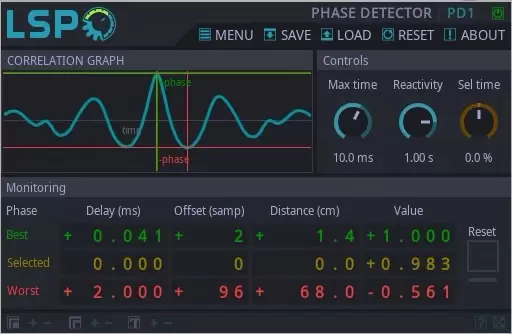
Figure 1: A typical phase correlation meter plugin: LSP Phase Detector. The readings (in the “Value” section at the bottom of the interface) can be used to determine phase relationships. (Image Source: Translator of this article)
2. Adjusting Levels and Panning
Adjusting levels and panning helps maintain phase coherence within a mix. This ensures that every element in the audio is clearly presented, creating a more dynamic and engaging sound that captures the listener’s attention.
Specifically, this can be achieved through:
-
- Balanced Levels: Ensure the levels of each track are balanced, preventing any single track from being too prominent and causing phase discrepancies.
- Strategic Panning: Use panning intentionally to create a sense of space in the mix while avoiding phase cancellation caused by improper stereo placement.
By meticulously adjusting levels and panning, engineers can craft a more cohesive and balanced mix, effectively minimizing the impact of phase cancellation.
6. Conclusion
Ultimately, understanding and addressing phase cancellation is key to achieving high-quality audio recordings. By mastering the fundamentals of phase, sound engineers can employ effective techniques to identify and avoid phase issues. From careful microphone placement to utilizing visual tools and monitoring techniques, there are numerous strategies to maintain phase coherence during the recording process. By prioritizing phase integrity, producers can create cleaner, tonally balanced mixes that captivate listeners and elevate the overall listening experience.
About the Author: Dídac
Dídac is a professional audio engineer, music producer, and software engineer. He is the founder and CEO of MasteringBOX and the author of many articles on the blog.


UNCUCO S-01A Straight Type Professional Recording Studio Desk-Music Production
Price range: $1,295.00 through $1,758.00- Fully Customizable: Size, Logo, Color, Lighting, Style, Finish, Casters, Special Requirements
- Free Shipping to Worldwide, No Customs Duties.
- Zero Fee Door to Door Delivery, Multiple Protection Packing.
- Upgrade Your Studio Space Right Now !


UNCUCO S-02B Curved Type Recording Studio Desk-19 Inch Rack Workstation
Price range: $1,323.00 through $1,695.00- Fully Customizable: Size, Logo, Color, Lighting, Style, Finish, Casters, Special Requirements
- Free Shipping to Worldwide, No Customs Duties.
- Zero Fee Door to Door Delivery, Multiple Protection Packing.
- Upgrade Your Studio Space Right Now !


UNCUCO S-03C Curved Type Studio Desk | Professional Music Production Desk for Audio Console Mixer
Price range: $1,678.00 through $1,887.00- Fully Customizable: Size, Logo, Color, Lighting, Style, Finish, Casters, Special Requirements
- Free Shipping to Worldwide, No Customs Duties.
- Zero Fee Door to Door Delivery, Multiple Protection Packing.
- Upgrade Your Studio Space Right Now !


UNCUCO S-04D Curved Type Recording Studio Workbench 19-Inch Rack Audio Production Mixing Desk
Price range: $1,698.00 through $1,852.00- Fully Customizable: Size, Logo, Color, Lighting, Style, Finish, Casters, Special Requirements
- Free Shipping to Worldwide, No Customs Duties.
- Zero Fee Door to Door Delivery, Multiple Protection Packing.
- Upgrade Your Studio Space Right Now !


UNCUCO S-05E Studio Mixing Desk: The Ultimate Workstation for Avid C24 & Pro Tools Workflows
$1,748.00- Fully Customizable: Size, Logo, Color, Lighting, Style, Finish, Casters, Special Requirements
- Free Shipping to Worldwide, No Customs Duties.
- Zero Fee Door to Door Delivery, Multiple Protection Packing.
- Upgrade Your Studio Space Right Now !


UNCUCO S-06F 3-Rack Studio Desk For Audio Production Console
$1,950.00- Fully Customizable: Size, Logo, Color, Lighting, Style, Finish, Casters, Special Requirements
- Free Shipping to Worldwide, No Customs Duties.
- Zero Fee Door to Door Delivery, Multiple Protection Packing.
- Upgrade Your Studio Space Right Now !


UNCUCO S-07Q Recording Studio Table Music Audio Control Operation Desk
$878.00- Fully Customizable: Size, Logo, Color, Lighting, Style, Finish, Casters, Special Requirements
- Free Shipping to Worldwide, No Customs Duties.
- Zero Fee Door to Door Delivery, Multiple Protection Packing.
- Upgrade Your Studio Space Right Now !


UNCUCO S-01A 1.6M Studio Console Desk | Professional Audio Workstation Furniture
Original price was: $1,250.00.$921.00Current price is: $921.00.- Fully Customizable: Size, Logo, Color, Lighting, Style, Finish, Casters, Special Requirements
- Free Shipping to Worldwide, No Customs Duties.
- Zero Fee Door to Door Delivery, Multiple Protection Packing.
- Upgrade Your Studio Space Right Now !


UNCUCO Custom Recording Studio Table For Audio Control Console Mixer
$982.00- Fully Customizable: Size, Logo, Color, Lighting, Style, Finish, Casters, Special Requirements
- Free Shipping to Worldwide, No Customs Duties.
- Zero Fee Door to Door Delivery, Multiple Protection Packing.
- Upgrade Your Studio Space Right Now !